> ## Documentation Index
> Fetch the complete documentation index at: https://docs.airlead.de/llms.txt
> Use this file to discover all available pages before exploring further.
# Airlead Connect overview
> Workspace-to-workspace lead delivery with Connect IDs and partnerships.
# Airlead Connect overview
Airlead Connect delivers leads between two Airlead workspaces. It keeps the sender's delivery transaction connected to the recipient's list or channel, so structured feedback can travel back.
## When to use Connect
Use Connect when both organizations work in Airlead and want:
* workspace-to-workspace delivery
* agreed commercial terms
* an explicit field mapping
* feedback or Storno linked to the original transaction
Use a webhook integration instead when the recipient needs delivery into an external system.
## How the connection works
```mermaid theme={null}
flowchart LR
S[Markets sender] -->|Connect partnership| R[Recipient list or channel]
R -->|Feedback or Storno| T[Sender transaction]
```
1. The recipient creates a Connect endpoint for a list or channel.
2. The recipient shares the Connect ID and, when required, its secret securely.
3. The sender connects a buyer to that endpoint.
4. Both sides review terms and field mapping.
5. A synthetic lead verifies the complete path.
6. The partnership is activated for production.
## Connect ID
A Connect ID identifies the receiving endpoint and begins with `AC-`.
It is created when you set up Connect on the recipient list or channel. Receiving a first production lead is a separate verification step and is **not** required to issue the ID.
### Create the Connect ID
On the recipient side:
1. Open the list or channel.
2. Go to **Technik**.
3. Under **Airlead Connect**, choose **Connect einrichten**.
4. Copy the Connect ID and share it with the Markets sender.
Before setup, Technik shows that no Connect code exists yet:
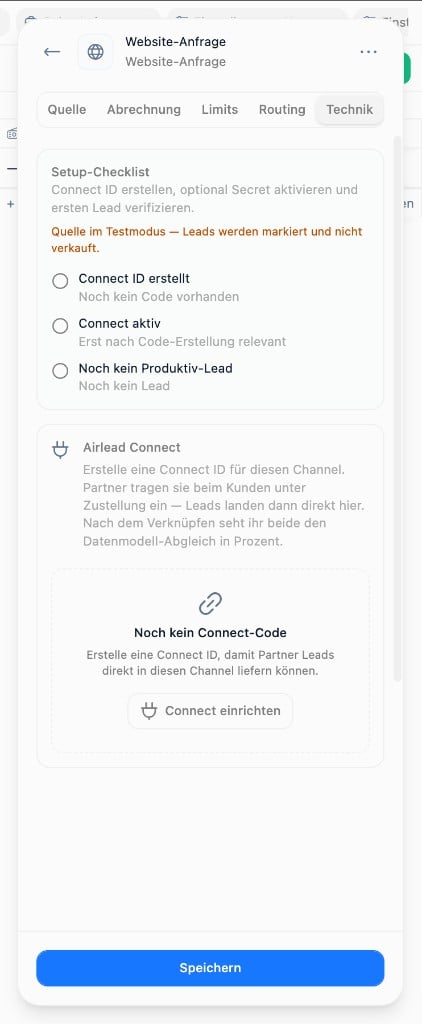 After setup, the Connect ID is visible immediately. You can require a Connect secret and toggle **Connect aktiv**:
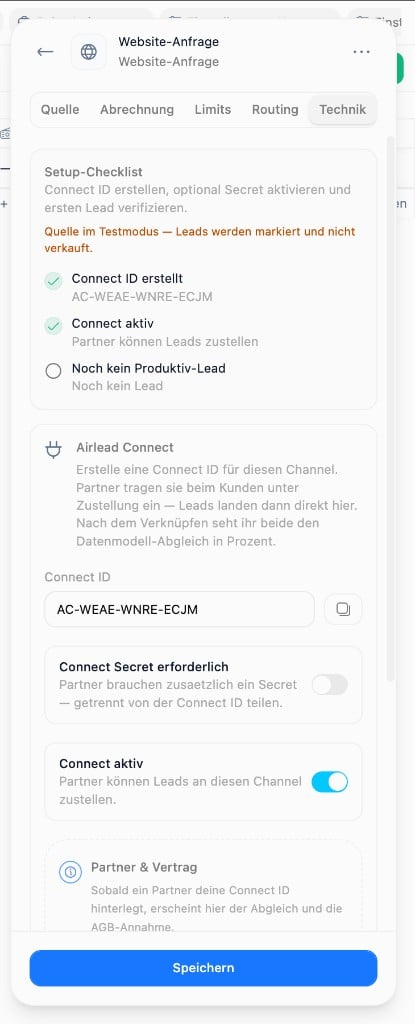 The setup checklist tracks:
| Step | Meaning |
| ----------------------- | ------------------------------------------------------------------ |
| **Connect ID erstellt** | Endpoint exists and the `AC-…` code can be shared |
| **Connect aktiv** | Partners may deliver to this endpoint |
| **Produktiv-Lead** | At least one live lead has arrived (verification, not ID creation) |
An endpoint can require a Connect secret. Share it separately from the ID and rotate it if it is exposed.
## Partnership
A partnership binds:
* the sender's buyer and commercial context
* the recipient endpoint
* the agreed terms
* the sender-to-recipient field mapping
Delivery should not go live until all four are verified.
## Before production
* Use synthetic contact details.
* Confirm the expected product and list or channel.
* Inspect every mapped field on the recipient side.
* Verify consent data and required values.
* Submit one feedback outcome and confirm that the sender sees it.
* Agree on Storno reasons and response times.
## If delivery fails
Check the Connect ID, required secret, endpoint state, partnership state, field compatibility, and recipient target. Repeatedly resolving an invalid ID can be rate-limited.
Next: [Partnerships and field mapping](/guides/connect/partnerships-mapping) · [Feedback and Storno](/guides/connect/feedback-storno) · [Connect integration](/developers/connect-integration)
The setup checklist tracks:
| Step | Meaning |
| ----------------------- | ------------------------------------------------------------------ |
| **Connect ID erstellt** | Endpoint exists and the `AC-…` code can be shared |
| **Connect aktiv** | Partners may deliver to this endpoint |
| **Produktiv-Lead** | At least one live lead has arrived (verification, not ID creation) |
An endpoint can require a Connect secret. Share it separately from the ID and rotate it if it is exposed.
## Partnership
A partnership binds:
* the sender's buyer and commercial context
* the recipient endpoint
* the agreed terms
* the sender-to-recipient field mapping
Delivery should not go live until all four are verified.
## Before production
* Use synthetic contact details.
* Confirm the expected product and list or channel.
* Inspect every mapped field on the recipient side.
* Verify consent data and required values.
* Submit one feedback outcome and confirm that the sender sees it.
* Agree on Storno reasons and response times.
## If delivery fails
Check the Connect ID, required secret, endpoint state, partnership state, field compatibility, and recipient target. Repeatedly resolving an invalid ID can be rate-limited.
Next: [Partnerships and field mapping](/guides/connect/partnerships-mapping) · [Feedback and Storno](/guides/connect/feedback-storno) · [Connect integration](/developers/connect-integration)