> ## Documentation Index
> Fetch the complete documentation index at: https://docs.airlead.de/llms.txt
> Use this file to discover all available pages before exploring further.
# Understand channels
> Learn what a Markets channel controls and how to read its Input, Activity, Output, and Flow views.
# Understand channels
A channel is the workspace where a Markets team controls the distribution of a defined stream of interests.
It answers four questions:
1. Where do the interests come from?
2. Which product and qualification data do they carry?
3. Which buyers are allowed to receive them?
4. What happened during each delivery attempt?
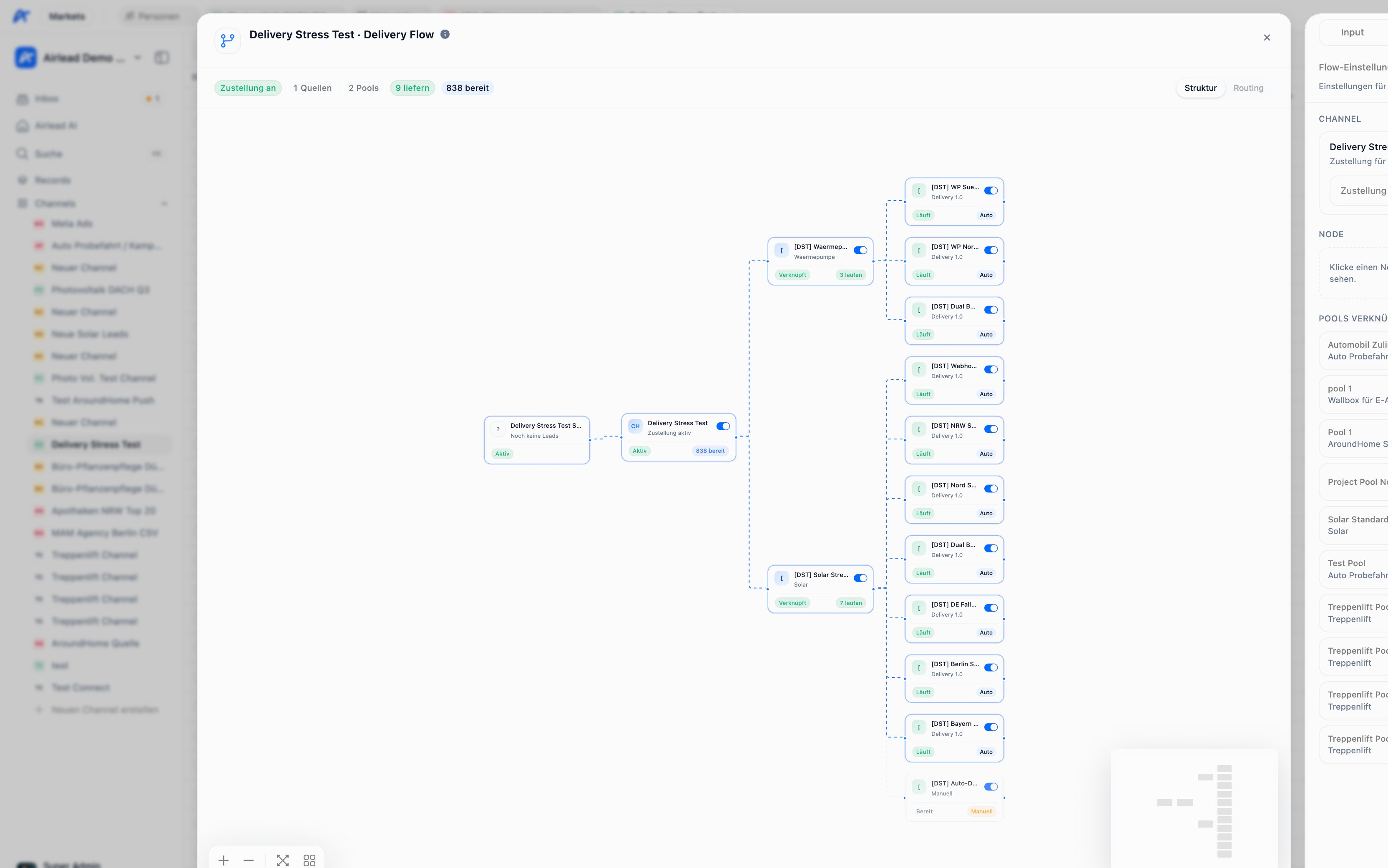 ## What belongs to a channel
* **Input:** sources supplying leads to the channel
* **Interests:** the product-specific requests available for evaluation
* **Output:** pools, buyers, criteria, delivery settings, and capacity
* **Activity:** ingest, matching, attempts, deliveries, and block reasons
* **Flow:** a visual overview of how input and output are connected
## What does not belong only to a channel
The underlying person and interest records remain part of the workspace-wide Records database. The channel controls distribution; it is not a separate contact database.
## Read the channel table
## What belongs to a channel
* **Input:** sources supplying leads to the channel
* **Interests:** the product-specific requests available for evaluation
* **Output:** pools, buyers, criteria, delivery settings, and capacity
* **Activity:** ingest, matching, attempts, deliveries, and block reasons
* **Flow:** a visual overview of how input and output are connected
## What does not belong only to a channel
The underlying person and interest records remain part of the workspace-wide Records database. The channel controls distribution; it is not a separate contact database.
## Read the channel table
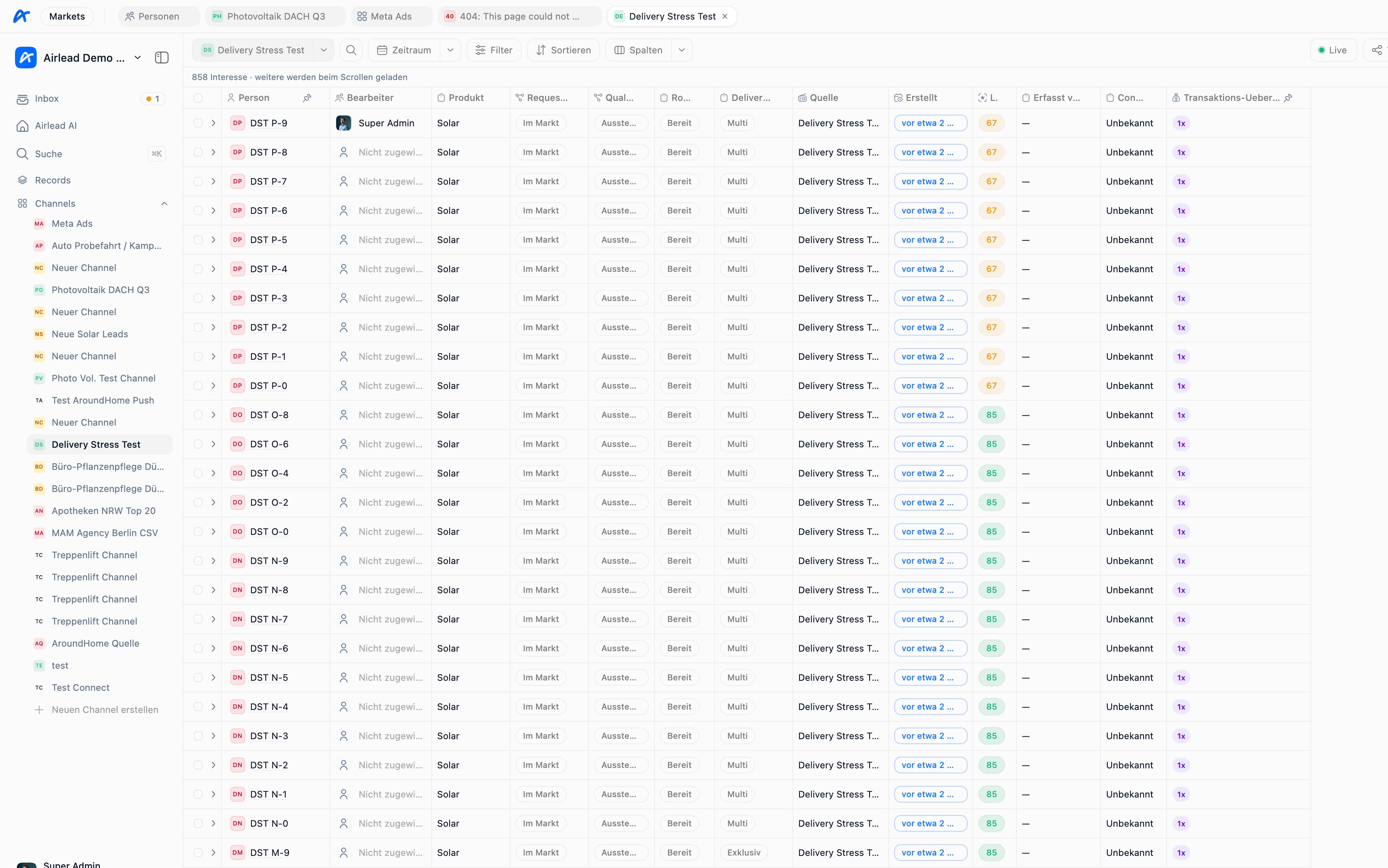 Each row represents an interest available in the channel. Useful columns include:
* product and source
* quality and request status
* routing readiness
* delivery policy
* transaction summary
An interest being visible does not mean it can already be delivered.
## When an interest can be delivered
Airlead evaluates several layers:
1. The interest is ready for routing.
2. The channel permits delivery.
3. A linked pool and buyer are active.
4. Product and field criteria match.
5. Capacity and delivery limits are available.
6. The buyer's delivery destination is configured.
7. For automated delivery, Delivery 1.0 is enabled and allowed by the plan and usage budget.
Manual delivery can be used to verify the path before Delivery 1.0 is enabled.
## Exclusive and Multi
* **Exclusive:** intended for one winning buyer.
* **Multi:** may be delivered to several eligible buyers up to the configured limit.
The policy belongs to the interest or its effective channel defaults. A Multi policy does not guarantee several deliveries; it only allows them.
## Channel vs. source, list, and pool
| Concept | Purpose |
| ------- | ------------------------------------------- |
| Source | Brings and maps data into Airlead |
| Channel | Controls distribution in Markets |
| Pool | Groups buyers for eligibility and routing |
| List | Organizes received work in Company Platform |
## Common questions
### Should I create one channel per buyer?
Usually no. A channel represents a stream or market of interests; several buyers can participate through pools and criteria. Separate channels when supply, product scope, operating rules, or reporting need a clear boundary.
### Why is an interest in Records but not in my channel?
The interest may not have been placed in that channel, may belong to another source or product, or may have been created for a list instead.
### Why is an interest in the channel but not delivered?
Visibility and routing readiness are not the same as buyer eligibility. Follow [Troubleshoot a delivery](/guides/troubleshooting/delivery).
Next: [Understand sources](/guides/channels-delivery/sources) · [Buyers, pools, and criteria](/guides/channels-delivery/buyers-pools-criteria) · [Manual delivery and Delivery 1.0](/guides/channels-delivery/auto-and-manual)
Each row represents an interest available in the channel. Useful columns include:
* product and source
* quality and request status
* routing readiness
* delivery policy
* transaction summary
An interest being visible does not mean it can already be delivered.
## When an interest can be delivered
Airlead evaluates several layers:
1. The interest is ready for routing.
2. The channel permits delivery.
3. A linked pool and buyer are active.
4. Product and field criteria match.
5. Capacity and delivery limits are available.
6. The buyer's delivery destination is configured.
7. For automated delivery, Delivery 1.0 is enabled and allowed by the plan and usage budget.
Manual delivery can be used to verify the path before Delivery 1.0 is enabled.
## Exclusive and Multi
* **Exclusive:** intended for one winning buyer.
* **Multi:** may be delivered to several eligible buyers up to the configured limit.
The policy belongs to the interest or its effective channel defaults. A Multi policy does not guarantee several deliveries; it only allows them.
## Channel vs. source, list, and pool
| Concept | Purpose |
| ------- | ------------------------------------------- |
| Source | Brings and maps data into Airlead |
| Channel | Controls distribution in Markets |
| Pool | Groups buyers for eligibility and routing |
| List | Organizes received work in Company Platform |
## Common questions
### Should I create one channel per buyer?
Usually no. A channel represents a stream or market of interests; several buyers can participate through pools and criteria. Separate channels when supply, product scope, operating rules, or reporting need a clear boundary.
### Why is an interest in Records but not in my channel?
The interest may not have been placed in that channel, may belong to another source or product, or may have been created for a list instead.
### Why is an interest in the channel but not delivered?
Visibility and routing readiness are not the same as buyer eligibility. Follow [Troubleshoot a delivery](/guides/troubleshooting/delivery).
Next: [Understand sources](/guides/channels-delivery/sources) · [Buyers, pools, and criteria](/guides/channels-delivery/buyers-pools-criteria) · [Manual delivery and Delivery 1.0](/guides/channels-delivery/auto-and-manual)